Install Naptio on your iPhone
No App Store download: install via “Add to Home Screen”.
-
1On your iPhone or iPad, open Safari and go to Naptio’s main page . URL:
https://hungryfaceai.github.io/hungryface/home/If you’re seeing these instructions inside another app (Mail, Messages, social, etc.), first open Naptio’s main page in Safari. -
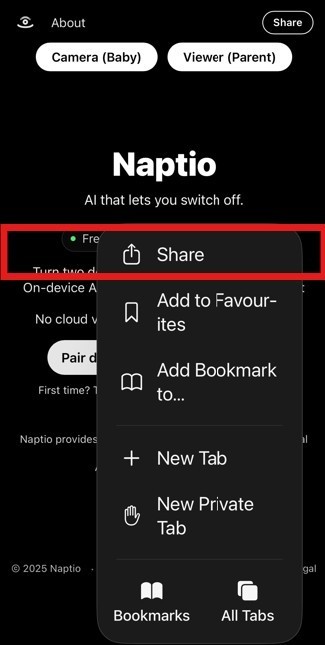
2In Safari, tap the Share icon in the toolbar (at the bottom of the screen on iPhone, top right on iPad).

-
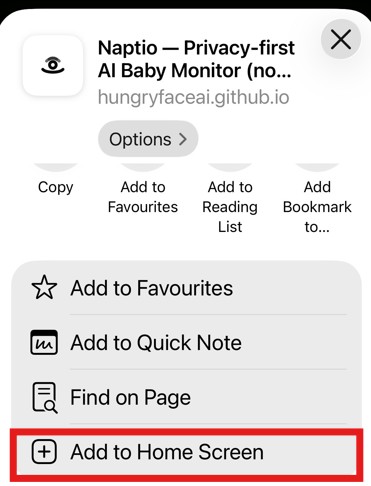
3In the sheet that opens, scroll if needed and tap Add to Home Screen.
-
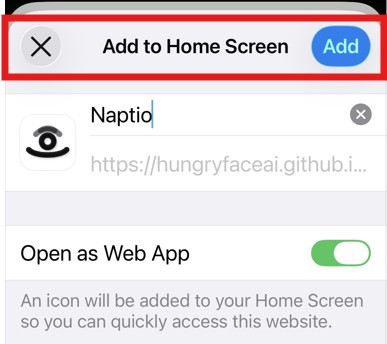
4Confirm the name (Naptio) and tap Add.
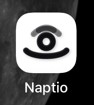
 You’ll now see the Naptio icon on your Home Screen and can open it just like any app.
Tip: For the best experience, always launch Naptio from the Home Screen icon rather than from a browser tab.
Using Android instead? You can install Naptio as an Android app from Google Play .